
Lower effort to answer
Speaking takes seconds where typing a considered answer takes minutes, so more people respond.
Ask a question
Collect spoken answers inside the video when what matters is pronunciation, phrasing, or confidence.
What it does
Audio is faster for the respondent than typing and tells you more than a written answer.
Speaking takes seconds where typing a considered answer takes minutes, so more people respond.
For language work, the spoken answer is the only answer that means anything.
Each clip is stored against the person, ready to review in sequence.
In practice
Language labs, sales practice, and open feedback people will not type.
In depth
Use Mindstamps Voice Response collection to break the barriers of multiple choice and connect with your audience like never before.
With more and more employees, learners, and teams working remotely, it’s critical to create as personal of an experience as possible with your video content. Whether you’re using Mindstamp to train a sales team, assess a language learning student, or confirm understanding of concepts in corporate communications, the voice response question is a powerful tool that brings the conversation to the viewer - regardless of where they’re located.
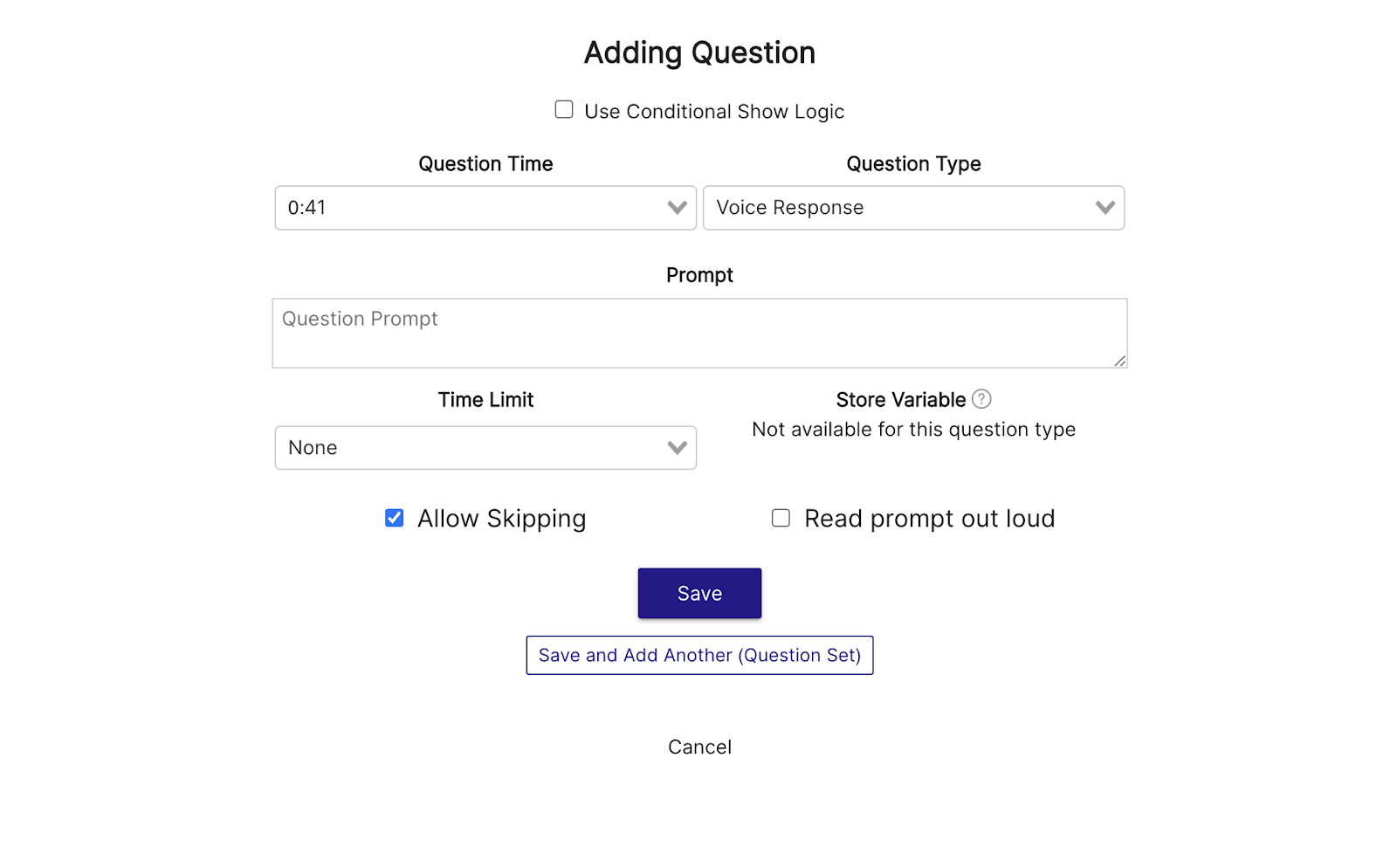
Adding voice response questions to your Mindstamp video is simple! Select the “Question” interaction from the toolbar below the video, then choose “Voice Response” from the “Question Type” dropdown menu. Once “Voice Response” is selected, you’ll be able to add your prompt, apply a time limit to your question, and adjust additional settings like “Skipping” and having the prompt read aloud.
Once you’re satisfied with the configuration of your question, hit save and begin collecting valuable responses! Your viewer's experience will pause to show the question and provide them the opportunity to record a voice clip in-video (desktop and mobile are both compatible!) Continue reading to learn more about use-cases for Voice Response questions.
Historically, traditional video has been a “sit back and watch” experience. It’s likely that anyone you encounter has memory of at least one painfully dull viewing experience from an e-learning course, corporate training seminar, or other video-related obligation. That’s why Mindstamp exists - to boost engagement and create results driven video by directly involving viewers with the content on-screen.
With Voice Response questions you can do exactly this by creating “conversational video.” Maybe you’re a talent acquisition agency looking to pre-qualify a candidate, but don’t have the resources to interview each person live. Or, perhaps you’re a trainer who wants to hear each student's top 3 takeaways from the seminar but don’t have time to sit down with each one. In these examples and more, learners or employees are becoming a part of the conversation while providing you with valuable, audible data.
Customer experience is more important than it’s ever been. Your clients are 2-3 clicks away from telling the world how they feel about your company, employees, and overall experience. Understanding this, it’s imperative that your client-facing training is up to par and properly preparing your staff for what’s ahead. With the Voice Response question, you can assess critical components of your representatives repertoire including tonalities, emphasis, word choice, and more. As the old adage goes - it’s not what you say, it’s how you say it .
If you’re interested in learning about a world that could benefit from hearing the voice of their video viewers - look no further than language learning. With Voice Response questions, take your online training and assessment to the next level by ensuring your students have a firm grasp on the language they’re practicing, and offer coaching and development if they don’t.
What gets measured
Related
These combine on one timeline — most videos use three or four together.
Let viewers select every option that applies, and score the whole set rather than a single pick.
Explore →Set the correct response on any question so Mindstamp scores it automatically and reports who passed.
Explore →Collect a real date from the viewer inside the video, in a format that stays usable downstream.
Explore →Ask viewers to circle, mark, or annotate directly on the frame, and keep the drawing as their submitted answer.
Explore →Give viewers a dropdown when there are too many options to show as buttons, and keep the frame clean.
Explore →Ask an open question inside the video and collect typed answers against each viewer, no form page required.
Explore →Questions
Yes — the browser asks once, and recording happens without any install.
Yes. Responses are listed per viewer and exportable alongside the rest of their answers.
Try it on one video
One spoken response tells you what three written ones would not.