
Keep existing tools
Your form builder, scheduler, or dashboard runs inside the video rather than being replaced.
Extend it
Embed an external tool — a form, a map, a booking widget, a dashboard — directly into the video experience.
What it does
The tools you already pay for work better at the moment the video creates the need for them.
Your form builder, scheduler, or dashboard runs inside the video rather than being replaced.
The viewer completes the action without a new tab and without losing their place.
The embed appears at the moment it is relevant instead of sitting on the page permanently.
In practice
Whatever the next step already lives in.
In depth
Mindstamp videos open the door to engagement opportunities that traditional video has never been capable of. One powerful way we achieve this is by allowing creators to embed HTML content directly into video experiences - reducing viewer fatigue.
Continue on to learn more about in-video embedding, as well as how you might use it to maximize your own content!
Within Mindstamp, you have an ‘interaction’ (something that prompts or grabs attention) followed by an ‘action’ (what happens when the viewer clicks on it?). One of the available actions is “Show Message.”
For example, you could place a button in your video that says “Click Me!” with the “Show Message” action. Once a viewer clicks on the button, a text block will appear, displaying your prewritten message on-screen.
But traditional text isn’t all you’re able to add! You can also use this powerful action to embed HTML content directly into your video. By placing an iFrame embed code in the “Show Message” text box, you’re able to activate embedded content upon button click!
Locate an online resource that has an exportable embed code. There are loads of these out there and the opportunities are endless! For this example, we’ll be posting a company podcast in our video.
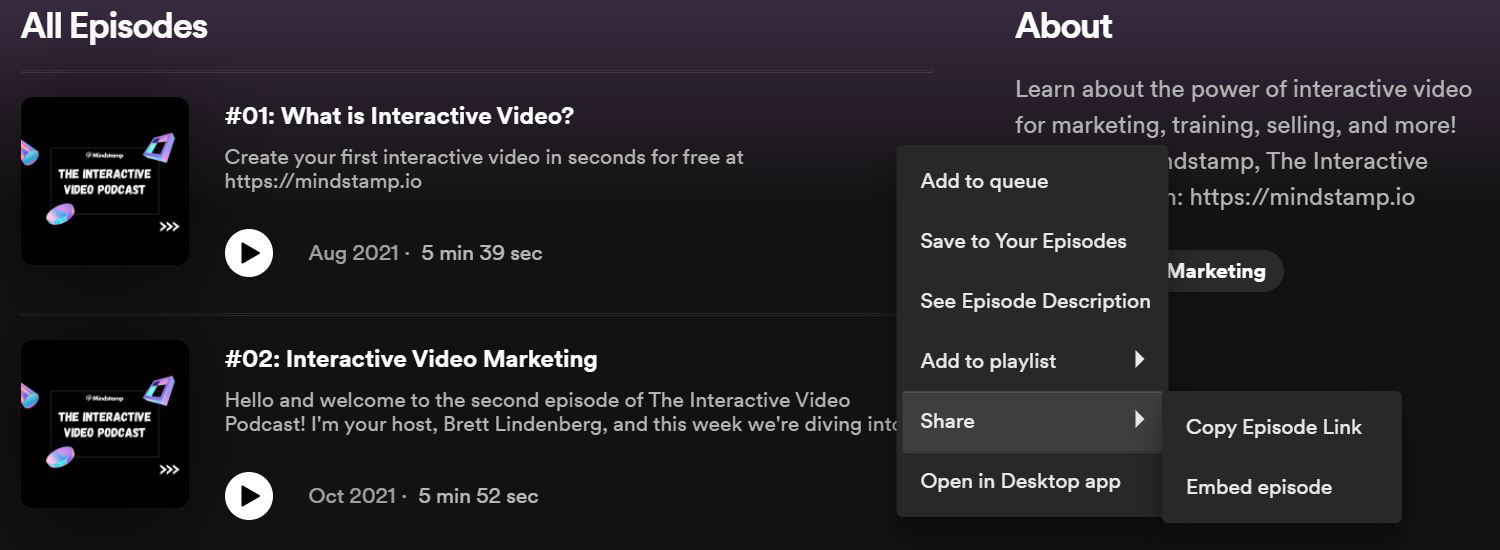
Once you’ve got a resource, simply navigate to the embed code. This is typically found under the sharing settings of the content in question. See Spotify example below:
Many sites, like Spotify, have a “Copy” button that will automatically attach it to your clipboard for an easy paste in the destination!
What gets measured
Related
These combine on one timeline — most videos use three or four together.
Show a custom HTML panel on top of the player — a form, a table, a calculator, or your own component.
Explore →Control colours, logo, and player styling so the interactive experience looks like your product, not a tool.
Explore →Open a Calendly or HubSpot calendar as an interaction, so the meeting is taken at the moment the buyer decides.
Explore →Ask for contact details before the video starts, at a chosen moment, or on a specific interaction — without sending anyone to a form page.
Explore →Generate a certificate when a viewer completes and passes, so evidence of training exists without anyone producing it.
Explore →Send viewers to any timecode from a button, hotspot, or answer — forward to skip, back to review.
Explore →Questions
Yes — the embedded tool behaves as it does anywhere else, and Mindstamp reports the interaction around it.
Anything that can be embedded on a normal web page, subject to the source allowing it.
Try it on one video
Move one step out of the landing page and into the moment that earns it.